Verifying a 301 map when Shopify blocks your crawler
The migration itself went fine. We were retiring a client's Adobe Commerce store — the ecommerce platform they'd run the business on for years — and standing up a fresh Shopify build in its place. That's not the interesting part.
We'd moved a store onto Shopify from a legacy platform, and the redirect map was the piece I cared most about. Every indexed URL from the old site mapped to its new home — category paths, product URLs with the old platform's ID suffixes, blog permalinks, the odd campaign landing page still pulling traffic from a years-old email. A few thousand rows, loaded into Shopify's URL redirects ahead of go-live.
A redirect map you haven't verified is a hope, not a map. So the plan for launch morning was simple: load the legacy URLs into Screaming Frog in list mode, confirm each one 301s to the right destination, and move on to the rest of the checklist.
The crawl died a few hundred URLs in.
429s from a Cloudflare we weren't using
Every failed request came back the same way:
HTTP/2 429 Too Many Requests
server: cloudflare
cf-ray: 8f3c91ab2e4c9271-LHR
cf-mitigated: challenge
Which was confusing, because we'd deliberately taken Cloudflare out of the picture. DNS for the domain was hosted on Cloudflare, but every record pointing at Shopify was grey-clouded — DNS only, no proxy. That isn't optional. Shopify doesn't support proxied records or Orange-to-Orange setups on connected domains, for two solid reasons:
- Certificate issuance. Shopify provisions and renews TLS certificates by verifying domain ownership over HTTP (the ACME handshake). A proxy in front intercepts those challenges, and certificates stall in "pending" or silently fail to renew.
- Bot detection. A second proxy layer rewrites request attributes before they reach Shopify, which degrades the platform's own traffic classification. Shopify would rather see your visitors as they actually are.
So the domain resolved straight to Shopify. No proxy of ours anywhere in the path. And yet: Cloudflare challenge pages.
The answer is that Shopify's storefront edge is Cloudflare. Every request to every Shopify store terminates at Shopify's own Cloudflare zone, regardless of where the merchant's DNS lives. Grey-clouding our records didn't remove Cloudflare from the stack — it just made sure ours stayed out of the way of theirs. The 429s were Shopify's bot protection wearing Cloudflare's badge.
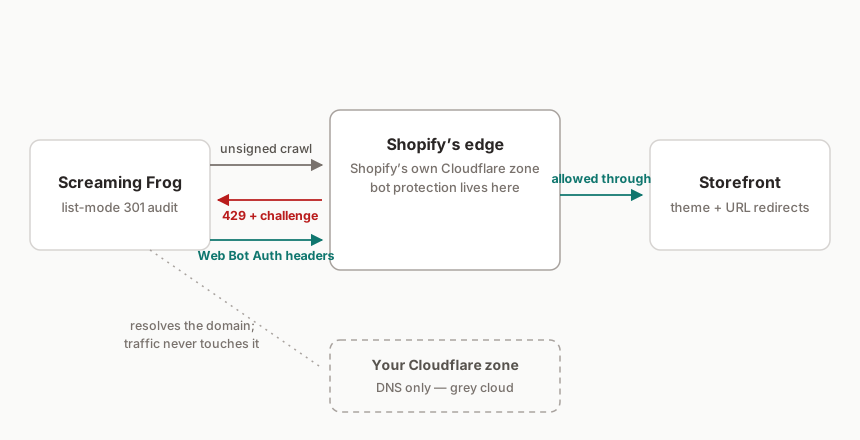
And in fairness, from that system's point of view we looked exactly like a scraper. A single IP hammering thousands of URLs in rapid sequence, most of them returning 301s, on a storefront that had existed for a few hours. Blocked, correctly, by design. Correct behaviour is still a problem when the entire point of the exercise is confirming the launch hasn't torched a decade of accumulated search equity.
The workarounds that half-worked
| Attempt | Outcome |
|---|---|
| Throttle to 1 URL/s | Fewer 429s, but still fell over partway through a full pass |
| Browser user-agent string | No difference — classification isn't UA-based |
| List-mode crawls in small batches | Eventually completes, with hours of babysitting and gaps between runs |
The batching approach is the trap. It produces a spreadsheet that looks finished, but every 429 in it is an unknown, not a pass — and a redirect audit with holes is worse than no audit, because it tells you things are fine when it hasn't actually checked.
Web Bot Auth
The proper fix turned out to be recent: Shopify ships an implementation of Web Bot Auth, the emerging standard for cryptographically identifying legitimate crawlers.
The standard itself is worth a moment. Web Bot Auth is built on HTTP Message Signatures, an IETF standard, with Cloudflare doing much of the drafting. I won't pretend the cryptography is my specialism, but the shape of it is easy to follow: a crawler signs each request with a key only it holds, publishes the matching public key where the receiving network can fetch it, and the edge checks the two agree before letting the request through. Identity backed by maths rather than by a user-agent string or IP reputation — both of which any scraper can fake in a config file.
Shopify's implementation turns that model around to suit merchants. You don't manage keys or publish anything. The store mints signed header values from the admin, and you hand them to whichever tool needs access. Credit where due: I found this via Flatline Agency's write-up, which saved me a support ticket.
The process, as I ran it:
- In Shopify admin, go to Online Store → Preferences and scroll to the crawler access section. Click Create signature.
- Name it for the tool and the job — "Screaming Frog — post-migration audit" beats "test" when someone reviews these credentials in six months. Pick the domain it applies to and a validity period. Ninety days is the ceiling.
- Shopify hands you three values. Copy them somewhere safe; they're credentials, not configuration:
Signature-Input: sig1=("@authority" "signature-agent");created=1752105600;expires=1759881600;keyid="..."
Signature: sig1=:base64-signature-value:
Signature-Agent: "https://shopify.com"
- In Screaming Frog, add all three under Configuration → HTTP Header, exactly as issued. Sitebulb, JetOctopus and OnCrawl have equivalent custom-header settings.
- Crawl again.
The difference was immediate. Full list-mode pass over the legacy URL set, no throttling theatrics, zero 429s. Every row either confirmed its 301 target or surfaced a genuine mapping error we could fix — which is all I'd wanted from launch morning in the first place.
A few sharp edges to know about:
- Signatures expire and can't be renewed. Maximum ninety days, then you create a new one. Fine for an audit; a nuisance if you run scheduled crawls, so diarise it.
- They're scoped to a single domain. Relevant to migrations specifically: if the old domain still resolves and redirects at the edge, checking it needs its own signature.
- Treat the values like passwords. Anyone holding them crawls your store unthrottled until expiry. Delete the signature when the job's done.
The lesson I've actually taken into the next migration is about sequencing, not Shopify. Redirect verification is a go-live task, which means crawler access is a pre-launch task. Creating the signature now sits in the checklist a week before cutover, right next to lowering the DNS TTL.